How it works
Every lead followed up. Every dollar tracked to where it came from.
Tailgate Sales Pro does two things. It makes sure no lead slips through the cracks, and it shows you which marketing brings in the money. Here's how.
Get notified when we launchBuilt for the phone in your truck.
Most contractor software is designed around an office. Someone at a desk runs the schedule, the invoices and the reports, and the phone app is there so the crew can check in from the job. That works for a company with an office manager. It doesn't work when you're the office, the crew and the salesman, and your phone is the only computer you own.
Tailgate Sales Pro was designed the other way around. Every screen was built for a phone first, for one person: the contractor who's up a ladder when the lead calls.
- There's no desktop version, because you don't need one.Setup, leads, reminders and reports all happen on your phone.
- Offline is built for the sales side.When contractor apps work without signal, it's usually for the crew: clocking in, filling out job forms, or looking up a job you already opened. Tailgate Sales Pro lets you add a brand-new lead, log the call you just made and schedule the estimate with no signal at all. Everything saves when you're back in range.
- Fast enough to use in a driveway.A new lead goes in in about 30 seconds, and you're set up in under 10 minutes with nothing to configure.
The core of the app
You don't have to remember who to call.
Save a lead and its follow-up schedule is set. You don't build reminders or set dates. The app handles it from the rhythm you select when you sign up.
Pick how hard you want to be pushed:
Just the important ones
3 days, 1 week, 2 weeks, then weekly
A steady rhythm
Next day, 3 days, 1 week, then weekly
Keep me on it
4 hours, next day, 3 days, then every 3 days
- Reminders tell you where you left off."You visited the kitchen site 3 days ago." "You texted Sarah." "No contact logged yet, added 2 days ago." You never have to dig through texts to remember.
- The message is already written.Tap to text or email, check the pre-written follow-up, change what you want, and send it from your own phone.
- The clock resets when you make contact.Log a call or text and the next reminder lines up from there.
- Start the day knowing where to start.A morning summary, at a time you pick, shows who's due today, who's been waiting longest, and which leads are going cold.
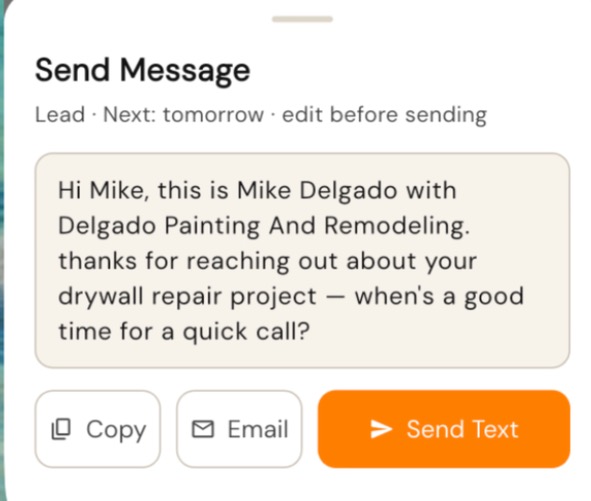
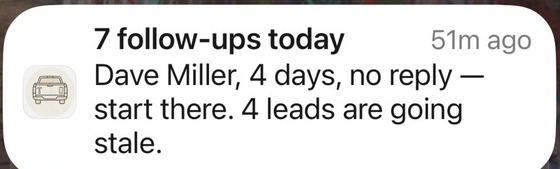
Saved from the driveway in 30 seconds.
- Name and phone number first. Pull them straight from your contacts or type them in. The app flags a number that isn't in a valid format before it's saved.
- Where did they find you? Pick from 16 common sources: referral, yard sign, Google, Facebook, Angi, truck signage, or add your own. That one tap is what makes the marketing report work.
- Remembers your last job type, so you're not picking it every time.
- "Have you talked with them yet?" Answer yes and they're saved as a Prospect, with reminders counting from that conversation. Answer no and they're saved as a Lead, with a reminder to reach out.
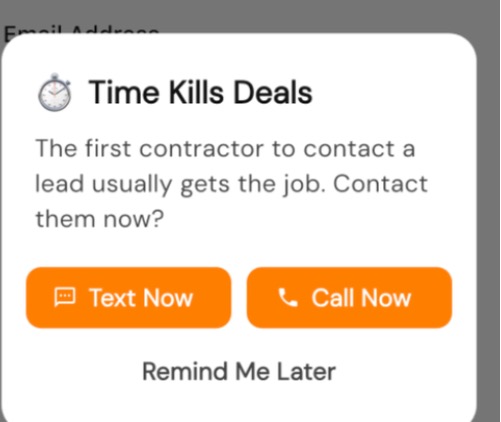
- Time kills deals. Right after you save, the app offers Text Now, Call Now or Remind Me Later. The fastest follow-up is the one you do while you're still standing there.
Set up in under 10 minutes. No settings.
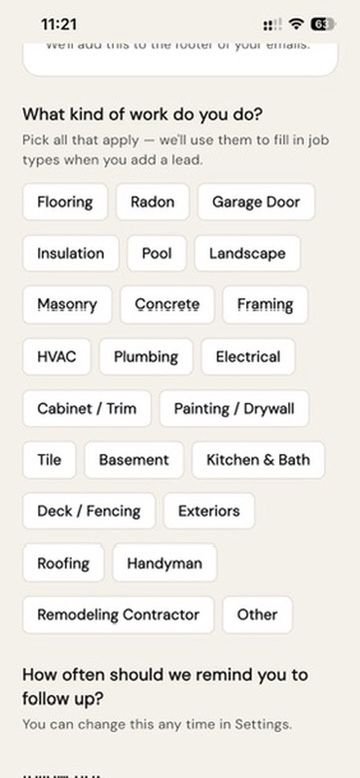
Pick your trades from a common list of 23, like remodeling, handyman, painting or roofing. Pick a follow-up rhythm in plain English. Your business address is optional. That's it. There's no setup checklist and no configuration screens. You land on "Add a lead and we'll remind you when to follow up."
Find out which marketing actually pays.
Most contractors spend money on yard signs, Google, Angi and truck wraps without knowing which one brings in the jobs. Because every lead in Tailgate Sales Pro is tagged with where it came from, the app can tell you.
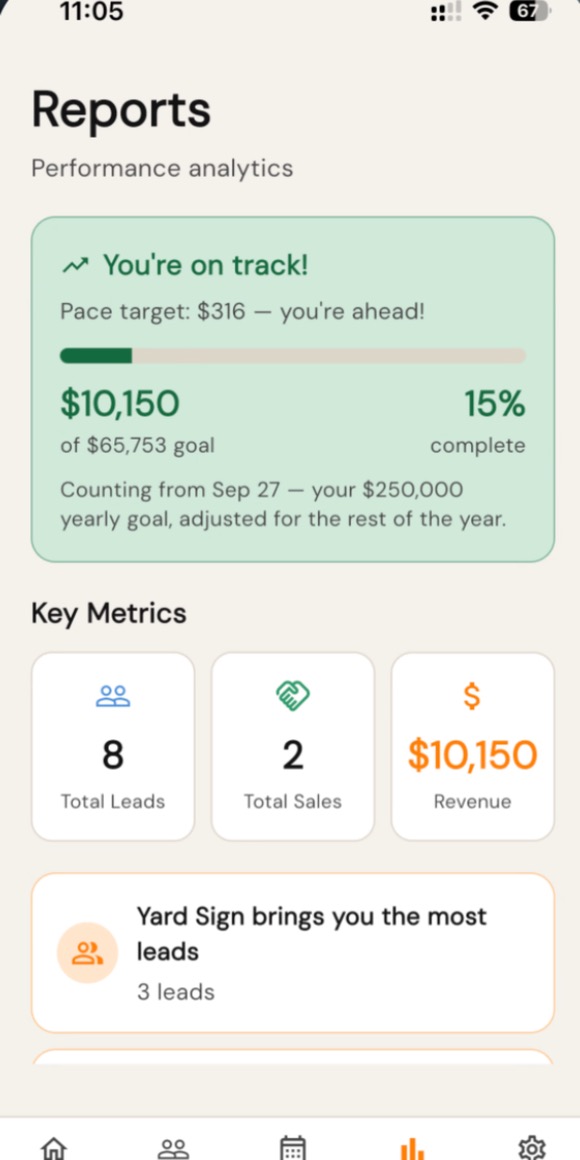
- The answer in one sentence. "Google brings you the most leads." "Yard Sign has made you the most money." No charts to decode.
- Every source, side by side. For each one you see leads, jobs won, revenue and how often those leads turn into jobs.
- Know your pace while there's time to fix it. Set a yearly sales goal and the app tells you where you stand, either "You're on track" or "Behind pace for your $125,000 goal."
- Totals at a glance. Total leads, sales and revenue.
Win the job, then win the next one.
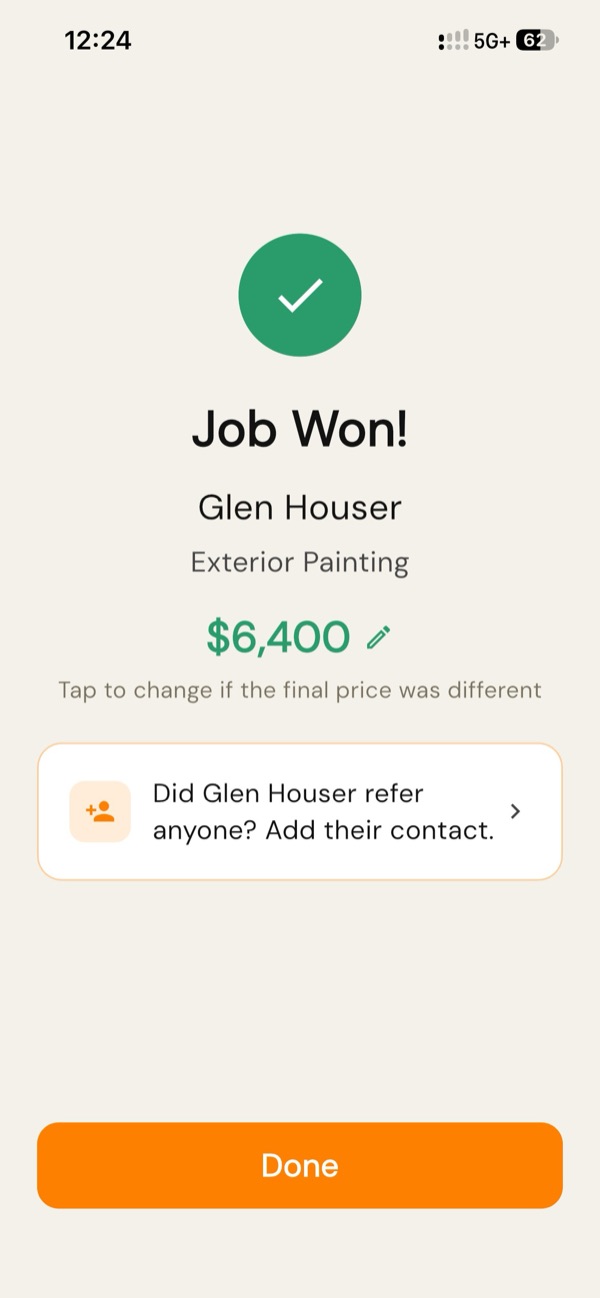
- Ask for the referral at the right moment. When you mark a job won, the customer is as happy as they'll ever be, and that's when the app prompts you to ask who else they know. If you skip it, you can add referrals later from the lead.
- Know who sent whom. Every referral becomes a new lead marked "Referral," with a note saying who referred them.
- See real dollars. Enter the job value when you win, and your home screen shows what you've closed.
- Finished jobs get out of the way. Won and lost leads move to Closed and their reminders stop. Your list only shows what still needs work.
Built for how you actually work.
Works with no signal.
Basements, rural lots and metal buildings don't stop you. Add leads, edit them, log calls and book appointments with no signal. Everything saves when you're back in range, and the app tells you when it has. (Photos need signal.)
Never late for an estimate.
Book a call, text, meeting or site visit right from the lead and get an alert before it starts. Move the appointment and the alert moves with it. You can sync Tailgate Sales Pro to your phone's calendar too, with the address, phone number and a link back to the lead. Your estimates show up in the calendar you already check, right next to the kids' games and the dentist, so you're not juggling two calendars.
The whole story on one screen.
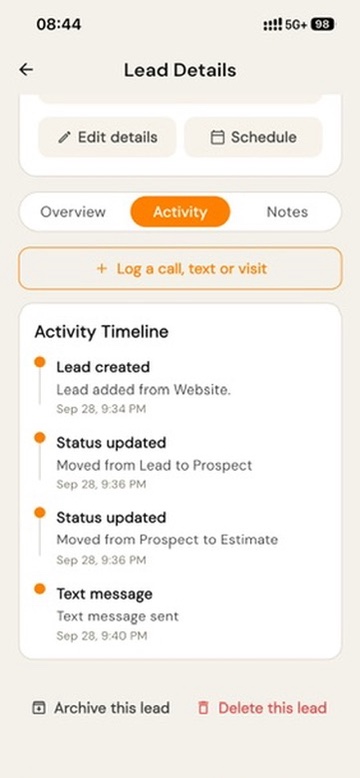
Every lead has a timeline showing when it came in, plus calls, texts, photos, appointments and site visits. When a customer calls back six weeks later, you know exactly where things stand.
Notes while they're fresh.
When you mark a site visit done, the app asks how it went. Jot it down in the truck instead of on a scrap of wood.
Job photos with the job.
Take or add photos on the lead, so they don't get lost in a camera roll of 4,000 pictures. Text one to a customer or a supplier in a couple of taps.
Knows when to let go.
After several follow-ups with no contact, the app asks "Still following up with Mike?" You can keep going, log something, or pause the reminders. A paused lead that calls back goes right back into the rhythm.
A clean list that keeps your numbers.
Archive a lead to get it off your list. It still counts in your reports, and you can bring it back anytime.
Past customers don't forget you.
Get one reminder to check in at 3 months, 6 months or a year after the job, whichever you choose. Keep your Google review link handy for asking.
Your phone is enough.
It runs on iPhone, iPad and Android, in light or dark mode. There's no laptop and no desk software.
What it doesn't do, on purpose
No estimating, no invoicing, no crew scheduling and no project management. Plenty of software already tries to run your whole business. This app does one job well, so you're set up in under 10 minutes and still using it in busy season.
Stop losing the leads you already have.
Tailgate Sales Pro launches in early 2027. Leave your name and we'll let you know the day it's ready.
Thanks.
We'll let you know when Tailgate Sales Pro is ready. Neil